
Browser extension for Edge and Chrome
Private, on-device live translations for any video.
Subbed shows translated captions for the video playing in a browser tab. It recognises and translates English, Japanese and Korean speech on your own PC, with your graphics card. The sound never leaves your computer.
Coming soon to the Chrome Web Store and Microsoft Edge Add-ons.
Needs a PC with a WebGPU graphics card. Free to try for 7 days, with unlimited captions.
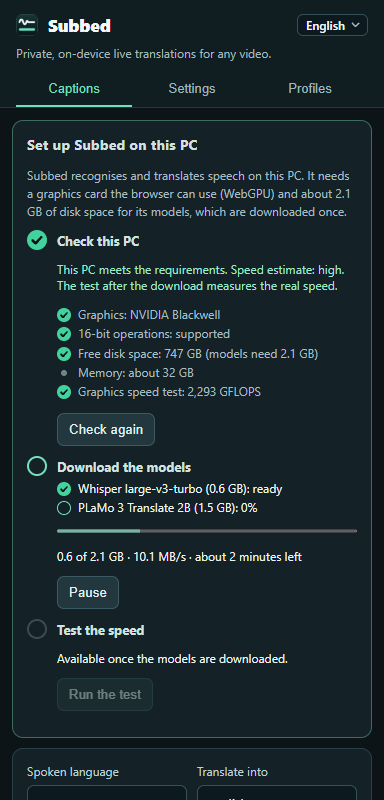

How it works
Check your PC
Open Subbed's side panel. Before anything is downloaded, it checks your graphics card and free disk space and estimates the speed.
Download once
The speech and translation models, about 2.1 GB, are downloaded once and checked piece by piece. A short test then measures your PC's real speed.
Play a video
Choose the spoken language and the language to translate into, start captions on the tab, and play. Captions appear over the video and in the panel.
What you get
- Captions in English, Korean or Japanese, for speech in any of the three languages.
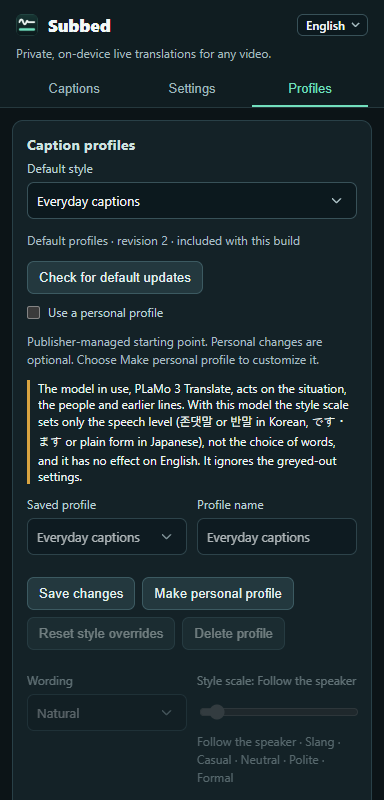
- Caption styles for what you watch: Everyday captions, Drama and entertainment, Games and livestreams, Workplace and polite speech.
- Polite or casual Korean and Japanese, set on a simple style scale.
- Pronunciation shown for Japanese and Korean lines.
- Captions tinted by voice to help tell speakers apart. The tint is an estimate from pitch.
- Preload: the video plays a few seconds late so each line appears with the speech. Not available for copy-protected or embedded videos.
- The interface in English, Korean or Japanese.
Private by design
- Speech recognition and translation run inside the extension, on your PC's graphics card.
- Captions aren't saved. They stay in memory while you watch and are erased when you close the browser.
- No account, no ads, no tracking.
Before you start
- A graphics card that supports WebGPU with 16-bit operations. Subbed checks this for free before downloading anything.
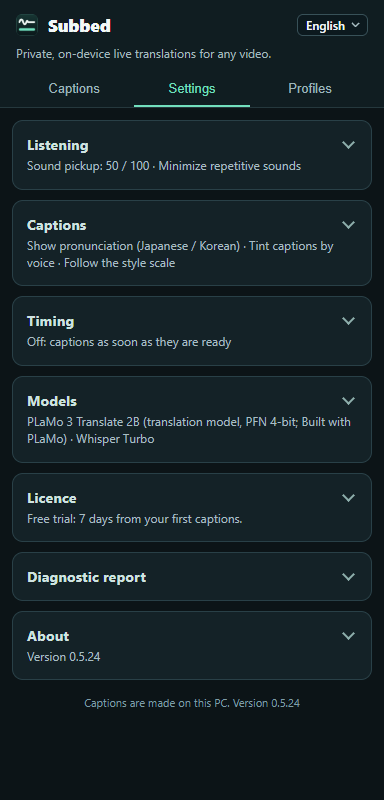
- About 2.1 GB of free disk space for the models. They stay on your PC, and you can remove them in Settings → Models.
- Microsoft Edge or Google Chrome. Tested on Windows 11 with Edge and Chrome 157.
Free and Pro
Free trial
Free
- Unlimited captions for 7 days from your first captions.
- Then captions need Subbed Pro.
Subbed Pro
US$9.99 / ₩14,900 once
- Unlimited captions on up to 3 PCs.
- Includes all future versions.
- Full refund within 14 days, for any reason.
Payment is handled by Stripe on its own page, where Subbed Pro is sold through Link. We never see your card. See the refund policy and the terms.
Credits
- Speech recognition: Whisper large-v3-turbo by OpenAI (MIT licence).
- Translation: PLaMo 3 Translate 2B by Preferred Networks, under the PLaMo Community License. Built with PLaMo.
- Speech detection: Silero VAD (MIT licence).
- Film in the clip and screenshot: Aki (2017) by Taylor Reynolds, CC BY 3.0, cropped, with Subbed's captions added.